Convert PST and OST files to MBOX
- Last updated: Feb 22, 2025
- Email Conversion & Migration
Outlook for Microsoft 365, Outlook 2021, Outlook 2019, Outlook 2016, Outlook 2013, Outlook 2010, Outlook 2007
Thunderbird version 38 and newer versions
The normal Thunderbird import process requires that you have a compatible version of Outlook installed on your computer. To import emails from Outlook to Thunderbird, Outlook must be set as your Default email client. If you don't have Outlook installed, there are alternatives listed below. If you are looking for a solution to convert pst to mbox, ost to mbox and migrate from Outlook to Thunderbird, follow these steps to import pst to Thunderbird.
Thunderbird Import PST Files Wizard
Thunderbird Import Wizard for Outlook was disabled in Thunderbird version 38 because it broke. This was fixed in Thunderbird version 58. If it crashes again, you can work around this by temporarily using an older version of Thunderbird, import your data, and then update Thunderbird to the latest version.
- In Thunderbird, go to Tools > Import….
- Choose Mail and click Next.
- Choose Outlook as the file type and click Next.
- Wait for the import to finish and click Finish.
Outlook is not installed
An alternative to Thunderbird's Import Wizard is to use a tool to transform your data to mbox format (.mbx), and then copy mbox files into Thunderbird Local Folders. There are a few such tools for Outlook to mbox conversion: PST to MBOX Converter, OST to MBOX Converter, OST PST Viewer.
PST to MBOX Converter and OST to MBOX Converter are one-click converters to convert entire Outlook data file to .mbox file format. If you need to convert selected emails from Outlook to mbox, or if you have data issues or crashes with Thunderbird Import Wizard for Outlook use OST PST Viewer.
Import Outlook data files to Thunderbird
There are steps to import .pst and .ost files into Thunderbird with OST PST Viewer.
1. Find your local .pst and .ost files
Outlook saves .pst and .ost files in a variety of different locations. Depending on what type of account you have, see the locations for Outlook 2007, Outlook 2010, and Outlook 2013, 2016 for example.
2. Open your .pst and .ost files
Download OST PST Viewer and browse for the .pst and .ost files. You will probably have several Outlook data files that need to be imported into Thunderbird.
3. Convert your emails to mbox or eml format
Select mailbox root folder in All folders pane, and click File > Export. Choose MBOX file format and click Ok.
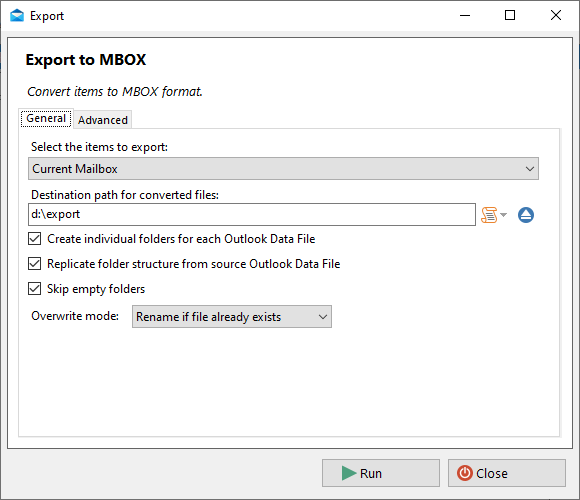
Wait for the export to finish.
4. Find your Thunderbird "Local Folders" Directory
Launch Thunderbird. Right click on "Local Folders" and select "Settings". Now you can see "Local directory" for your "Account Settings".
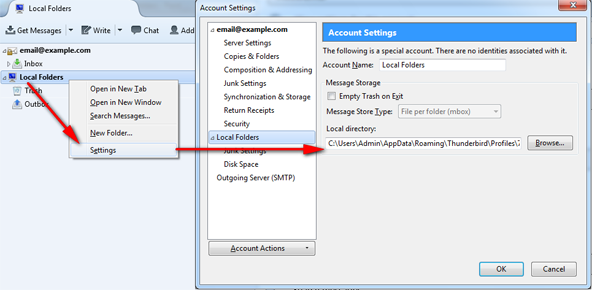
Something like this:
C:\Users\%username%\AppData\Roaming\Thunderbird\Profiles\7l36jvtj.default\Mail\Local Folders
(You need to have allowed "Show hidden files, folders, and drives)
5. Copy mbox files into Local Folders
Quit Thunderbird. Navigate to your Thunderbird "Local Folders" directory in an explorer and drag and drop your mbox files in there. The result mbox files are:
- The .sbd folders - used to store the folder hierarchy.
- The files that actually contain your messages (do not have any three-letter extension at all): Archive, Calendar, Contacts, Inbox,..
6. Browse mbox
Restart Thunderbird, and you should see the exported Outlook mailbox in your Thunderbird Local Folders list.
Frequently Asked Questions
The MBOX format is standardized, but differences in newline characters and encoding between Windows and Linux may affect Thunderbird’s ability to recognize emails. To ensure proper compatibility, use the ImportExportTools NG extension in Thunderbird:
- Open Thunderbird on your Linux system.
- Install ImportExportTools NG:
- Go to Menu ☰ → Add-ons and Themes
- Search for ImportExportTools NG and install it.
- Restart Thunderbird.
- Right-click Local Folders → Select ImportExportTools NG → Import mbox Files.
- Choose All mbox Files from directory (with sbd structure), then browse to your converted file.
This method should allow Thunderbird to correctly recognize and display your emails.
See Also
Convert archived, corrupted, or inaccessible Outlook Data Files (.pst and .ost) to Thunderbird MBOX quickly and easily.
Convert OST files from Microsoft 365, Exchange, IMAP, or Outlook.com accounts to Thunderbird MBOX quickly and easily.
This tool converts MBOX (Thunderbird, Apple Mail, etc.) files to Outlook. Maintains the on-disk folder structure of the mbox mailbox after conversion. Import mbox into existing or a new Outlook Data File (.pst and .ost).